

An apps button has recently appeared in my bookmarks bar on Google Chrome, linking to chrome://apps/.
I personally don’t use any apps on Chrome and find its presence in my bookmarks bar a bit annoying, luckily however you can remove the apps button despite the delete option been inactive when you right click it.
Google Chrome Apps Button Removal
To remove the button you first need to right click it, then simply look near the bottom of the menu and un-check the “show apps button” menu item to remove the new button.
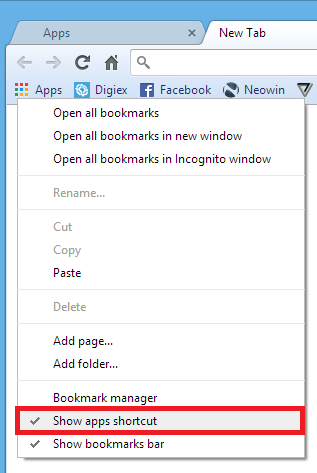
That’s it, your day can now go on as normal. I must admit it took me a good half a minute to realise how to remove the button from Chrome, however that was at 6am, before my morning cuppa tea, so my excuse is I was half asleep at the time!
