

Making Kodi autoplay a playlist when loaded, then repeat that playlist until stopped is not as straight forward as you might think, with some trial and error reading the issues various people encountered, this is how i ended up successfully making Kodi play and repeat my video play list when started / loaded up.
Firstly go to Settings > Appearance > Skin
Ensure you are using the Confluence skin and select “Settings”:

Then under the General setting “Enable playlist at startup” and select where the playlist is saved as the path:
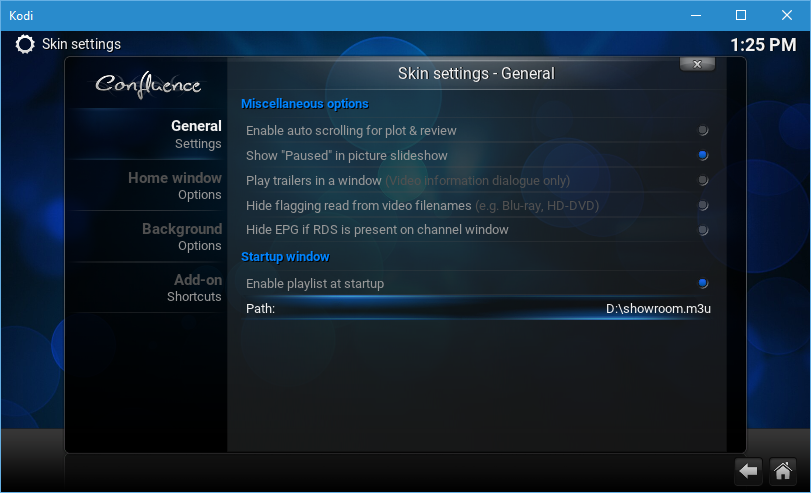
That’s the obvious part done, however if you do that and leave Kodi to it, you will find when you reach the end of the play list Kodi will not repeat it.
To have Kodi repeat this play list we need to place a little script in the Kodi userdata folder, the location of this will vary depending on the operating system you are using, see the table below for help:
| Operative system | File path |
|---|---|
| Android | Android/data/org.xbmc.kodi/files/.kodi/userdata/ |
| iOS | /private/var/mobile/Library/Preferences/Kodi/userdata/ |
| Linux | ~/.kodi/userdata/ |
| Mac | /Users/<your_user_name>/Library/Application Support/Kodi/userdata/ |
| LibreELEC/OpenELEC | /storage/.kodi/userdata/ |
| Windows | Start – type %APPDATA%\kodi\userdata – press <Enter> |
Once you are in the Kodi userdata folder you want to create a file called autoexec.py, you can do this in any text editor. For example Notepad on Windows or Nano on Linux based operating systems.
Simply paste the following in your autoexec.py file and save it:
import xbmc
xbmc.executebuiltin( “PlayerControl(repeat)” )
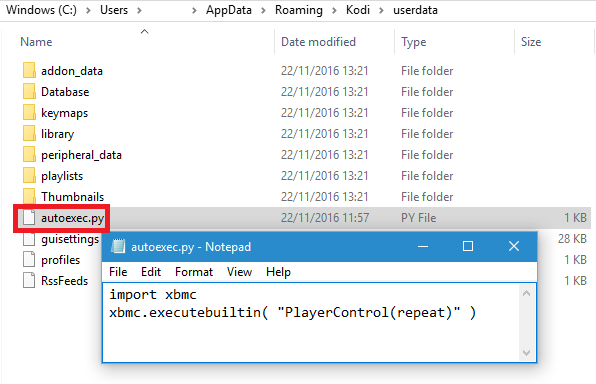
If for some reason you are having trouble here is a zipped copy of my autoexec.py you can simply unzip to your Kodi userdata folder.
The end result should be when Kodi boots your playlist will start playing and the autoexec.py script will ensure the play list repeats in-defiantly.
I have done the above on a Raspberry Pi 3 running Kodi via OpenELEC 6.0.3 with no issue, my videos happily repeat all day long in our showroom.
Final Note:
It’s worth mentioning you can also make Kodi start playing a playlist with the autoexec.py script:
import xbmc
xbmc.executebuiltin( “PlayMedia(/storage/.kodi/userdata/playlists/video/showroom.m3u)” )
xbmc.executebuiltin( “PlayerControl(repeatall)” )
However i found if the TV was not on when Kodi was loaded it would only play the first item on the playlist, then keep repeating the first item on the playlist only. This for me was not ideal as i needed everything to just work with no user interaction, which is what the solution detailed in this blog post allows for.
I hope this is of help to someone anyway!
